Google Wallet and Google Pay have officially launched in Nigeria. Here’s how the services work, which Nigerian bank cards are supported, how to set them up, and what the launch means for consumers and businesses.
Paying for everyday purchases with your phone has become easier in many parts of the world. Now, Nigerian Android users have another digital payment option to explore.
On 28 October 2026, Google announced that Google Wallet, including Google Pay, is now available in Nigeria. The launch introduces contactless payments for eligible users, alongside a digital wallet for storing supported payment cards and other digital essentials.
For Nigerian consumers, this could mean a more convenient way to pay at compatible payment terminals. For businesses, it highlights the growing importance of digital payments and the checkout experience.
But there are a few important details to understand before getting started. Not every Nigerian bank card is supported, and not every payment terminal accepts contactless payments.
Here’s what you need to know.
What Are Google Wallet and Google Pay?
Google Wallet and Google Pay are related services, but they serve different purposes.
Google Wallet is the app that allows users to store supported payment cards, tickets, boarding passes, loyalty cards and other digital items in one place, where those features are available.
Google Pay is the payment service that allows users to pay at participating online stores, in supported apps and at compatible contactless payment terminals.
In simple terms, Google Wallet stores your supported payment methods and digital items, while Google Pay enables you to use eligible payment methods to make transactions.
The two services work together to make certain everyday transactions more convenient.
Google says users in Nigeria can download Google Wallet from the Google Play Store and add supported payment cards to get started.
Official announcement: Google Wallet and Google Pay are now available in Nigeria.
What Can You Do With Google Wallet and Google Pay in Nigeria?
The launch brings several capabilities that may be useful to Nigerian consumers and businesses.
1. Make contactless payments with your phone
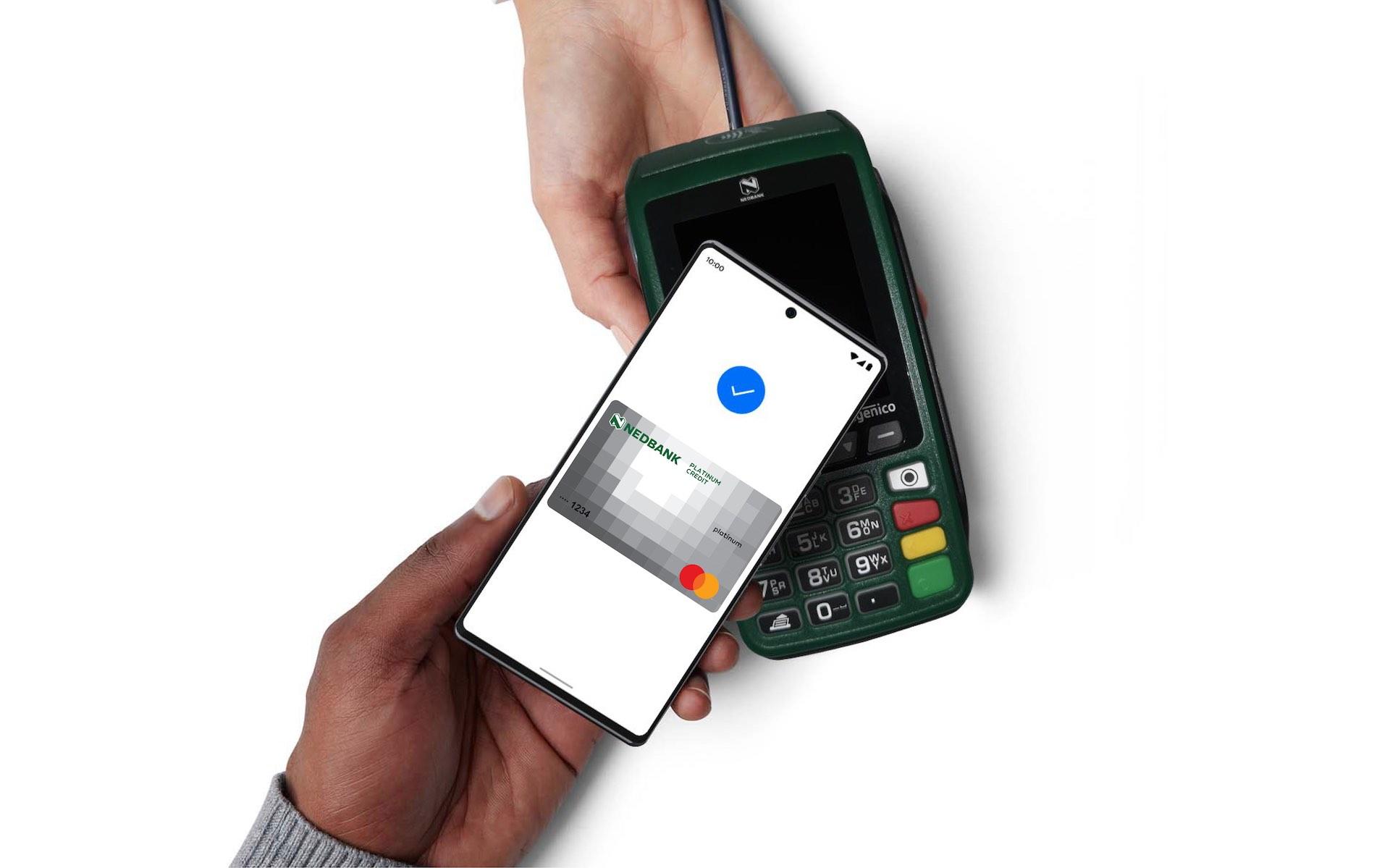
One of the main features is the ability to pay at compatible physical payment terminals using an eligible Android phone.
Instead of taking out your physical bank card, you can use your phone to complete a supported contactless transaction.
This can be useful when shopping, buying groceries or paying at participating businesses.
However, two requirements matter: your bank card must be supported, and the merchant must have a compatible contactless terminal.
Simply having Google Wallet installed does not mean every POS terminal in Nigeria will accept payments from your phone.
2. Store supported payment cards digitally
Google Wallet allows eligible users to add supported debit, credit or prepaid cards.
Once a card has been added and verified successfully, you can use it for supported transactions without necessarily carrying the physical card for every purchase.
Your bank determines whether a particular card can be added to Google Wallet. A card that works for ordinary online transactions is not automatically eligible for mobile-wallet payments.
3. Store tickets, boarding passes and other digital items
Google Wallet also supports certain non-payment items, including event tickets, boarding passes and loyalty cards.
This can help users keep compatible digital items accessible from their phones rather than searching through emails or carrying printed copies.
Availability depends on the relevant provider and the features supported in Nigeria.
4. Pay online and in supported apps
Google Pay can be used at participating websites and within supported apps that offer it as a payment option.
When shopping online, look for the Google Pay option at checkout. If the merchant supports it and your payment method is eligible, follow the instructions to complete your transaction.
The feature is not available at every Nigerian online store, so you should still check which payment methods a merchant accepts.
5. Benefit from additional payment security
Google says its payment services use multiple layers of security and industry-standard encryption.
If your phone is lost or stolen, Google’s Find My Device feature can help you locate, lock or erase the device remotely, depending on its settings and connectivity.
These protections can help reduce some risks, but users should still secure their devices, protect their Google accounts and monitor bank transactions regularly.
Which Nigerian Banks Support Google Pay?
This is one of the most important questions to answer before trying to set up the service.
Google’s current Nigeria payment-method listing identifies supported cards from four Nigerian banks.
| Bank | Supported card types listed by Google |
|---|---|
| FirstBank | Mastercard debit |
| Guaranty Trust Bank (GTBank) | Mastercard debit and prepaid |
| United Bank for Africa (UBA) | Mastercard credit, Mastercard debit, Mastercard prepaid and Visa prepaid |
| Zenith Bank | Mastercard credit, Mastercard debit and Mastercard prepaid |
Source: Google Wallet — Supported payment methods in Nigeria.
Important: This list refers to supported card types, not every card issued by each bank. Banks can restrict individual cards from mobile payments, and eligibility can change.
If your bank or card type is not listed, check Google’s official support page and contact your bank for confirmation. Do not assume that every Visa, Mastercard or local payment card will work.
How to Set Up Google Wallet in Nigeria
If you have a compatible Android phone and an eligible bank card, follow these steps.
Step 1: Download Google Wallet
Open the Google Play Store and search for Google Wallet. If the app is not already installed on your device, download it from the official store.
Make sure you are installing the genuine Google app rather than an imitation.
Step 2: Open the app
Launch Google Wallet and sign in to your Google account if prompted.
Follow the on-screen instructions to begin adding a payment card.
Step 3: Add your bank card
Choose the option to add a payment card and enter or scan the supported card details as instructed.
Google Wallet may require additional verification through your bank before the card can be used.
Step 4: Complete your bank’s verification process
Follow the verification instructions provided by Google Wallet and your bank.
If your card cannot be added, check that the card type is supported and contact your bank if necessary.
Step 5: Enable NFC for contactless payments
To pay by tapping your phone at a physical terminal, your Android phone must support Near Field Communication (NFC).
Make sure NFC is enabled in your device settings. You may also need to set Google Wallet as your default payment app, depending on your device.
Note: Adding a card to Google Wallet does not guarantee that every payment feature will be available. Your device, card, bank and the merchant’s payment setup must meet the relevant requirements.
How to Pay With Google Pay at a Nigerian Store
Once your card has been added successfully, making a contactless payment is straightforward when the merchant has a compatible terminal.
- Look for the contactless payment symbol at the checkout.
- Make sure NFC is enabled on your phone.
- Unlock your phone or complete the authentication required by your device.
- Hold the phone near the contactless payment reader.
- Wait for the terminal to confirm the transaction and follow any additional instructions.
If the payment fails, check that the card is eligible, the phone supports NFC, and the terminal accepts contactless payments.
You may need to use another payment method if the merchant’s terminal does not support contactless transactions.
Is Google Pay Safe to Use in Nigeria?
Security is an important consideration whenever you add payment credentials to a digital service.
Google says its payment services use multiple security layers and encryption to help protect financial information. Users can also take steps to protect their devices and accounts.
For safer use:
- Download Google Wallet only from the official Google Play Store.
- Protect your phone with a strong screen lock.
- Enable two-factor authentication on your Google account where available.
- Never share your banking PIN, passwords or one-time verification codes with anyone.
- Keep your phone’s operating system and apps updated.
- Monitor your bank transactions and report suspicious activity promptly.
- Use Find My Device to lock or erase a lost phone when appropriate.
Digital wallets can improve convenience, but they do not eliminate every form of fraud or payment risk. Continue to follow your bank’s security guidance.
What Does Google Pay’s Arrival Mean for Nigerian Businesses?
The launch is relevant not only to consumers but also to businesses that sell products or services online and offline.
Digital payment options can influence how customers complete purchases. A checkout process that supports the payment methods customers prefer may reduce friction, particularly for mobile-first shoppers.
Here are three areas Nigerian businesses should consider.
1. Review the customer checkout experience
For e-commerce businesses, every additional step at checkout can create friction.
Businesses should regularly review their payment options and make sure customers can understand how to complete a transaction.
If your payment provider supports Google Pay, offering it could give eligible customers another way to pay. However, availability should be confirmed with your payment processor before promising the option on your website.
2. Check physical payment infrastructure
Google Pay’s contactless feature depends on compatible payment terminals.
Businesses that accept in-person payments should ask their bank or payment service provider whether their POS terminals support contactless transactions and whether any configuration or upgrade is required.
A customer having a compatible phone is only one part of the process; the merchant also needs compatible infrastructure.
3. Keep payment choices relevant to your customers
Not every customer uses the same device, bank or payment method.
Businesses should avoid relying on one payment option alone. Maintain suitable alternatives and communicate accepted methods clearly.
The objective is to make paying easier without excluding customers whose cards or devices are not supported.
Does Google Pay Mean Nigerian Businesses Should Change Their Payment Systems?
Not necessarily.
The launch gives eligible users another payment option, but businesses should assess their current setup before making changes.
If you operate an online store, speak to your payment provider about Google Pay availability, fees, supported transactions and integration requirements.
If you run a physical shop, confirm that your POS terminal accepts contactless payments before advertising tap-to-pay as an option.
For businesses that already have an effective payment process, the best next step may simply be to monitor adoption and evaluate whether customers are asking for the service.
Technology should support a better customer experience, not create unnecessary complexity.
Google Wallet vs Google Pay: What’s the Difference?
| Feature | Google Wallet | Google Pay |
|---|---|---|
| Main purpose | Stores supported cards and digital items | Enables supported payments |
| Digital payment cards | Add and manage eligible cards | Uses eligible cards for transactions |
| Contactless payments | Provides access to cards stored in Wallet | Enables tap-to-pay where supported |
| Online checkout | Stores eligible payment methods | Appears as a payment option at participating merchants |
| Tickets and boarding passes | Stores supported digital passes | Not its primary function |
The names are related, but they are not interchangeable in every context. Google Wallet is the digital wallet app, while Google Pay is the payment service used for supported transactions.
The Traceline Digital Take
Google Wallet and Google Pay becoming available in Nigeria is another development in the country’s evolving digital payment landscape.
For consumers, the benefit is convenience: eligible users can add supported cards, make contactless payments at compatible terminals and keep certain digital items on their phones.
For businesses, the opportunity is to review how customers pay and whether their current checkout experience meets changing expectations.
However, availability matters. Not every Nigerian bank card is supported, and not every POS terminal accepts contactless payments. Businesses should confirm compatibility before making changes to their payment systems.
At Traceline Digital, we believe technology creates value when it solves real problems for customers and businesses.
Whether you operate an online store, a service business or a growing brand, the priority is to build a digital experience that makes it easier for customers to discover, trust and buy from you.
From Lagos to the world. We build digital experiences that move brands forward.
Visit Traceline Digital to explore our digital strategy, website development, SEO and digital marketing services.
Frequently Asked Questions
Is Google Pay available in Nigeria?
Yes. Google announced the availability of Google Wallet, including Google Pay, in Nigeria on 28 October 2026. Supported features depend on the device, payment card, bank and merchant.
Which Nigerian banks support Google Wallet?
Google’s current Nigeria listing includes eligible cards from FirstBank, GTBank, UBA and Zenith Bank. The supported card types differ by bank, so check Google’s official payment-method list before attempting to add a card.
Can I use Google Pay with any Nigerian bank card?
No. Your bank and card type must be supported. A card that works for ordinary online payments may not be eligible for Google Wallet contactless payments.
Do I need an Android phone with NFC?
You need a compatible Android phone with NFC to make contactless payments at physical terminals. Other Google Wallet features may have different requirements.
Can I use Google Pay for online shopping?
Yes, at participating websites and apps that offer Google Pay and accept your eligible payment method. It is not available at every online store.
Will Google Pay work on every POS terminal in Nigeria?
No. The merchant’s terminal must support compatible contactless payments. If it does not, you will need to use another payment method.
Is Google Wallet free?
Google’s announcement presents Wallet as an app for storing payment cards and digital items. Your bank, payment provider or merchant may still apply their usual fees or transaction terms. Check the relevant terms before making a payment.
Information checked against Google’s announcement and its Nigeria payment-method support page. Bank participation, card eligibility and product features may change. Confirm current details with Google and your bank before relying on a specific feature.